Thursday, November 10, 2011

Ajax Save in Mvc 3.0 Using Jquery


Hi,


Here I explain how to save form data using Ajax jquery so using this way page will not post back and data will be save.

So now let’s look how I have done

Here is my Simple View  


   1:  @model MvcApplication1.Model.UserInformation
   2:   
   3:  @{
   4:      ViewBag.Title = "Index";
   5:      Layout = "~/Views/Shared/_Layout.cshtml";
   6:  }
   7:   
   8:  <h2>Index</h2>
   9:   
  10:  <script src="@Url.Content("~/Scripts/jquery.validate.min.js")" type="text/javascript"></script>
  11:  <script src="@Url.Content("~/Scripts/jquery.validate.unobtrusive.min.js")" type="text/javascript"></script>
  12:  <script type="text/javascript">
  13:      $(document).ready(function () {
  14:   
  15:   
  16:   
  17:          $("#dplist").change(function () {
  18:              if (this.value == 2) {
  19:   
  20:                  $("#txtbox").attr('style', 'Display:inline');
  21:              }
  22:              else {
  23:                  $("#txtbox").attr('style', 'Display:none');
  24:              }
  25:          });
  26:   
  27:      });
  28:   
  29:      function AjaxSave() {
  30:                  
  31:          var rowData = $("#" + document.forms[0].id).serialize();
  32:          var url = '/Home/AjaxSave';
  33:     
  34:          $.post(url, rowData, function (JsonData) {
  35:   
  36:              debugger;
  37:   
  38:          });   
  39:   
  40:      }
  41:  </script>
  42:   
  43:  @using (Html.BeginForm(null, null, FormMethod.Post, new { id = "signupform" }))
  44:  {
  45:      @Html.ValidationSummary(true)
  46:      <fieldset>
  47:          <legend>UserInformation</legend>
  48:   
  49:          <div class="editor-label">
  50:              @Html.LabelFor(model => model.Name)
  51:          </div>
  52:          <div class="editor-field">
  53:              @Html.EditorFor(model => model.Name)
  54:              @Html.ValidationMessageFor(model => model.Name)
  55:          </div>     
  56:          
  57:           <div class="editor-label">
  58:              @Html.LabelFor(model => model.City)
  59:          </div>
  60:          <div class="editor-field">
  61:              @Html.EditorFor(model => model.City)
  62:              @Html.ValidationMessageFor(model => model.City)
  63:             </div>    
  64:             <div class="editor-field">
  65:              @Html.DropDownList("dplist",(SelectList) ViewBag.DpList)                            
  66:              @Html.TextBox("txtbox")  
  67:             </div>
  68:   
  69:          <p>
  70:              <input type="submit" value="Save" />
  71:              <input type="button" onclick="javascript:AjaxSave();"  value="AjaxSave" />  
  72:          </p>
  73:      </fieldset>
  74:  }
  75:   
  76:  <div>
  77:      @Html.ActionLink("Back to List", "Index")
  78:  </div>


Here is My Controller


   1:  using System;
   2:  using System.Collections.Generic;
   3:  using System.Linq;
   4:  using System.Web;
   5:  using System.Web.Mvc;
   6:  using MvcApplication1.Model;
   7:   
   8:  namespace MvcApplication1.Controllers
   9:  {
  10:      public class HomeController : Controller
  11:      {
  12:          //
  13:          // GET: /Home/
  14:   
  15:          public ActionResult Index()
  16:          {
  17:              initilization();
  18:              return View();
  19:          }
  20:   
  21:          public void initilization()
  22:          {
  23:              ViewBag.bhavik= "Bhavik Test"; 
  24:              List<SelectListItem> LiList=new List<SelectListItem>();
  25:              AddItemInlist("One", 1, LiList,  false);
  26:              AddItemInlist("Two", 2, LiList, false);
  27:              AddItemInlist("Three", 3, LiList, true);
  28:              AddItemInlist("Founr", 4, LiList, false);
  29:              AddItemInlist("Fibe", 5, LiList, false);
  30:              ViewBag.DpList = new SelectList(LiList, "Value", "Text");  
  31:   
  32:          }
  33:   
  34:          public void AddItemInlist(string Key,Int32 value, List<SelectListItem> addtolist,bool IsSelected)
  35:          {
  36:              SelectListItem Li = new SelectListItem();
  37:              Li.Text = Key;
  38:              if (IsSelected)
  39:              {
  40:                  Li.Selected = true; 
  41:              }
  42:              Li.Value =value.ToString();
  43:              addtolist.Add(Li); 
  44:   
  45:          }
  46:   
  47:          [HttpPost]
  48:          public ActionResult Index(UserInformation u)
  49:          {
  50:              initilization();
  51:   
  52:       
  53:              return View();
  54:          }
  55:   
  56:          [HttpPost]
  57:          public ActionResult AjaxSave(FormCollection form)
  58:          {
  59:              //Write Message what you want to display after save operation
  60:              string Name = form["Name"];
  61:              string Cist = form["City"];
  62:              string msg="Successfully Save Data";
  63:              return Json(msg);  
  64:          }
  65:   
  66:      }
  67:  }


Now Look how it’s Work
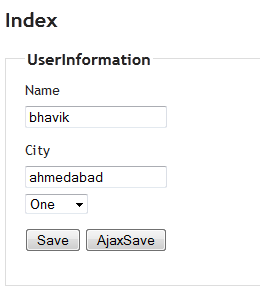


image


Details:


       Quick Point that need to take care


  •          I have 2 button Save and AjaxSave.

  •             Save will Work as data will post and redirect page.

  •             Using Ajaxsave I have Ajaxcall    using post method.

  •             I need to pass all filed value on controller for that I have collect all fields value using

  •            $("#" + document.forms[0].id).serialize();   pass this value in parameter $.post(url, rowData, function (JsonData) {

  •            Now Look at JsonData that will retrurn from Controller

                   string msg="Successfully Save Data";
                 return Json(msg);  You can use it to display message for what transaction has been happen


[polldaddy poll=5657416]

Mvc 3.0 Multi button on same view


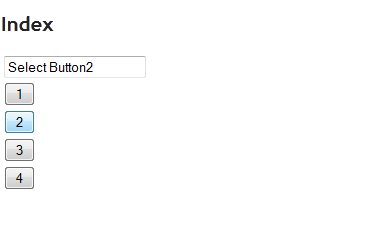
Here I explain how handle each button click on same view. Suppose your view contain more than one button and you need to perform different operation on click on button

Here is my View which contain simple 4 button and 1 text box

   1:   
   2:  @{
   3:      ViewBag.Title = "Index";
   4:  }
   5:  <script type="text/javascript">
   6:      function SendButtoninfo(id) {        
   7:          var Url = '/Button/CallButton/' + $("#" + id).val();
   8:          $.getJSON(Url, null, function (jsondata) {
   9:   
  10:             $("#Name").val('Select Button' + jsondata.toString());
  11:   
  12:          });
  13:          
  14:      }
  15:  </script> 
  16:  <h2>Index</h2>
  17:  <table>
  18:  <tr><td>@Html.TextBox("Name") </td></tr>
  19:  <tr><td><input type="button" id='cmd1' value="1" onclick="javascript:SendButtoninfo(this.id);" />   </td></tr>
  20:  <tr><td><input type="button" id='cmd2' value="2" onclick="javascript:SendButtoninfo(this.id);" /> </td></tr>
  21:  <tr><td><input type="button" id='cmd3' value="3" onclick="javascript:SendButtoninfo(this.id);" /> </td></tr>
  22:  <tr><td><input type="button" id='cmd4' value="4" onclick="javascript:SendButtoninfo(this.id);" /> </td></tr>
  23:  </table>


Here is My Controller


   1:  using System;
   2:  using System.Collections.Generic;
   3:  using System.Linq;
   4:  using System.Web;
   5:  using System.Web.Mvc;
   6:   
   7:  namespace MvcApplication1.Controllers
   8:  {
   9:      public class ButtonController : Controller
  10:      {
  11:          //
  12:          // GET: /4Button/
  13:   
  14:          public ActionResult Index()
  15:          {
  16:              return View();
  17:          }
  18:   
  19:          public ActionResult CallButton(int id)
  20:          {
  21:              return Json(id, JsonRequestBehavior.AllowGet);  
  22:          }
  23:   
  24:      }
  25:  }


Output


image


[polldaddy poll=5657416]

Wednesday, November 9, 2011

Mvc Show/hide textbox as per Dropdown Value

Hi,

Here I explain how you can show hide text box as per dropdown value

Here in my controller I have taken one list for dropdown 1 to 5


   1:   public class HomeController : Controller
   2:      {
   3:          //
   4:          // GET: /Home/
   5:   
   6:          public ActionResult Index()
   7:          {
   8:              initilization();
   9:              return View();
  10:          }
  11:   
  12:          public void initilization()
  13:          {
  14:              ViewBag.bhavik= "Bhavik Test"; 
  15:              List<SelectListItem> LiList=new List<SelectListItem>();
  16:              AddItemInlist("One", 1, LiList,  false);
  17:              AddItemInlist("Two", 2, LiList, false);
  18:              AddItemInlist("Three", 3, LiList, true);
  19:              AddItemInlist("Founr", 4, LiList, false);
  20:              AddItemInlist("Fibe", 5, LiList, false);
  21:              ViewBag.DpList = new SelectList(LiList, "Value", "Text");  
  22:   
  23:          }
  24:   
  25:          public void AddItemInlist(string Key,Int32 value, List<SelectListItem> addtolist,bool IsSelected)
  26:          {
  27:              SelectListItem Li = new SelectListItem();
  28:              Li.Text = Key;
  29:              if (IsSelected)
  30:              {
  31:                  Li.Selected = true; 
  32:              }
  33:              Li.Value =value.ToString();
  34:              addtolist.Add(Li); 
  35:   
  36:          }
  37:   
  38:          [HttpPost]
  39:          public ActionResult Index(UserInformation u)
  40:          {
  41:              initilization();
  42:       
  43:              return View();
  44:          }
  45:   
  46:      }


Now in  View Page


   1:    @Html.DropDownList("dplist",(SelectList) ViewBag.DpList)    
   2:     @Html.TextBox("txtbox", "", new {style="display:none"})   


Java script


   1:  <script type="text/javascript">
   2:      $(document).ready(function () {
   3:   
   4:   
   5:   
   6:          $("#dplist").change(function () {
   7:              if (this.value == 2) {
   8:   
   9:                  $("#txtbox").attr('style', 'Display:inline');
  10:              }
  11:              else {
  12:                  $("#txtbox").attr('style', 'Display:none');
  13:              }
  14:          });
  15:   
  16:      }); 
  17:  </script>


Now textbox will show only when dropdown value is set to 2 else it will hide.


I hope this will help you  


[polldaddy poll=5657416]

asp.net mvc 3.0 remote attribute

asp.net mvc 3.0 remote attribute For Custom Validation on Client Side

Now a day all web application validation required to done on client side. We all are facing problem for validation limitation on client side. Because we can validate email address, credit cards on JavaScript but related to specific validation for project we can't make it there or its very complicated. So now for that Microsoft introduces new attributes Remote we can use easily in mvc 3.0 Rozer for Custom validation.

Here is my simple User information view which contain Name and city

[sourcecode language="csharp"]
@model MvcApplication1.Model.UserInformation

@{
ViewBag.Title = "Index";
Layout = "~/Views/Shared/_Layout.cshtml";
}
<h2>Index</h2>
@using (Html.BeginForm()) {
@Html.ValidationSummary(true)

UserInformation
<div class="editor-label">@Html.LabelFor(model =&gt; model.Name)</div>
<div class="editor-field">@Html.EditorFor(model =&gt; model.Name)
@Html.ValidationMessageFor(model =&gt; model.Name)</div>
<div class="editor-label">@Html.LabelFor(model =&gt; model.City)</div>
<div class="editor-field">@Html.EditorFor(model =&gt; model.City)
@Html.ValidationMessageFor(model =&gt; model.City)</div>
}
<div>@Html.ActionLink("Back to List", "Index")</div>
<div>
[/sourcecode]

Here is User information Model


[sourcecode language="csharp"]
public class UserInformation
{
[Required]
[System.Web.Mvc.Remote("IsUserNameExits", "Validation")]
public string Name { get; set; }</code>

[Required]
public string City { get; set; }

}
[/sourcecode]

Now look at System.Web.Mvc.Remote Attributes where you can define custom rulers. I have create one Validation controller where i will put all custom validation Now here I explain Remote attributes in Mvc 3.0 for custom validation Look at my validation controller

[sourcecode language="csharp"] public JsonResult IsUserNameExits(string Name)
{

//you can write code for check in database

if (Name == "Bhavik")
{
return Json("Sorry UserName Already Taken", JsonRequestBehavior.AllowGet);

}
else
{
return Json(true, JsonRequestBehavior.AllowGet);
}

}
[/sourcecode]

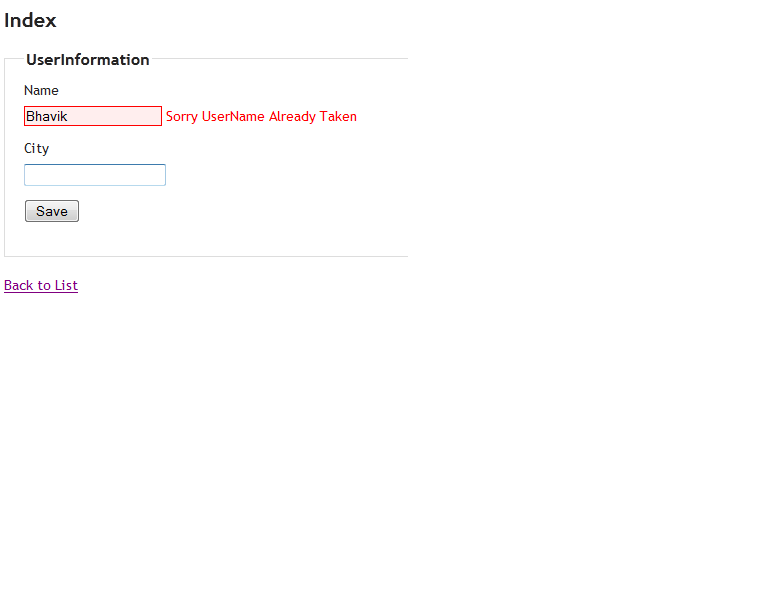
Now when i type in Name textbox application will check in IsUserNameExits method for if this user exits or not so this way you can make as much validation as you want related to specific to your project and call it from client side using remote attributes

Remote Attribute Mvc3.0 asp.net mvc 3.0 remote attribute For Custom Validation on Client Side
[polldaddy poll=5657416]